

It’s 5:40 a.m., and an employee has called in sick for a 6:00 a.m. shift. Someone has to find a qualified replacement who won’t go into overtime, reach them, update the schedule, and make sure payroll reflects the change. For many teams, that still happens through spreadsheets, group texts, and phone calls.
That’s a lot of manual work across a lot of shifts. Fifteen percent of U.S. workers usually work a non-daytime schedule, and in leisure and hospitality the figure is 40%, according to 2024–2025 data from the U.S. Bureau of Labor Statistics. The same survey found 9% of workers learn their schedule a day or less in advance.
This guide explains what shift management software is, how it works, which features matter, and how to choose one using your own schedule. For the day-to-day process behind it, see our guide to shift management.
What Is Shift Management Software?
Shift management software helps you plan, assign, monitor, and adjust employee shifts while keeping coverage, compliance, and labor costs under control. For organizations with large or spread-out workforces, it becomes the system that puts the right people in the right place at the right time.
Most shift management platforms cover:
- Employee scheduling
- Open-shift management
- Shift swaps and replacements
- Employee availability
- Overtime management and prevention
- Workforce communication
- Time and attendance
- Compliance rules and credential tracking
- Labor cost controls and reporting
You’ll also see the terms “shift management system” and “shift management app.” They usually mean the same thing: a web platform for managers, plus a mobile app for employees.
Shift Management Software vs. Employee Scheduling Software
Employee scheduling software creates the roster. Shift management software also handles everything around it: open shifts, last-minute coverage, rule enforcement, time and attendance, and labor costs. Scheduling is one step; shift management is the whole operation.
The difference shows up when something changes after the schedule is published. Here’s how the common options compare:
| Approach | Typical fit | Rule enforcement | When someone calls off | Link to time and attendance |
| Spreadsheets | One site with a few stable schedules | Manual; depends on the scheduler | Phone calls and texts | Separate; matched by hand |
| Basic scheduling app | Small teams with simple rules | Availability and basic conflicts | Post the open shift and wait | Often separate or an add-on |
| Scheduling module in an HR or payroll suite | Organizations that want one vendor for HR data | Varies; often built for standard schedules | Varies by product | Usually tied to payroll |
| Shift management software | Complex rules, many sites, or 24/7 coverage | Automatic: qualifications, overtime, availability, union rules | Finds qualified, rule-compliant replacements and offers them the shift | Built in, so scheduled and worked hours can be compared |
Products within each group vary, so treat this as a starting point and test any tool against your own rules.
How Shift Management Software Works
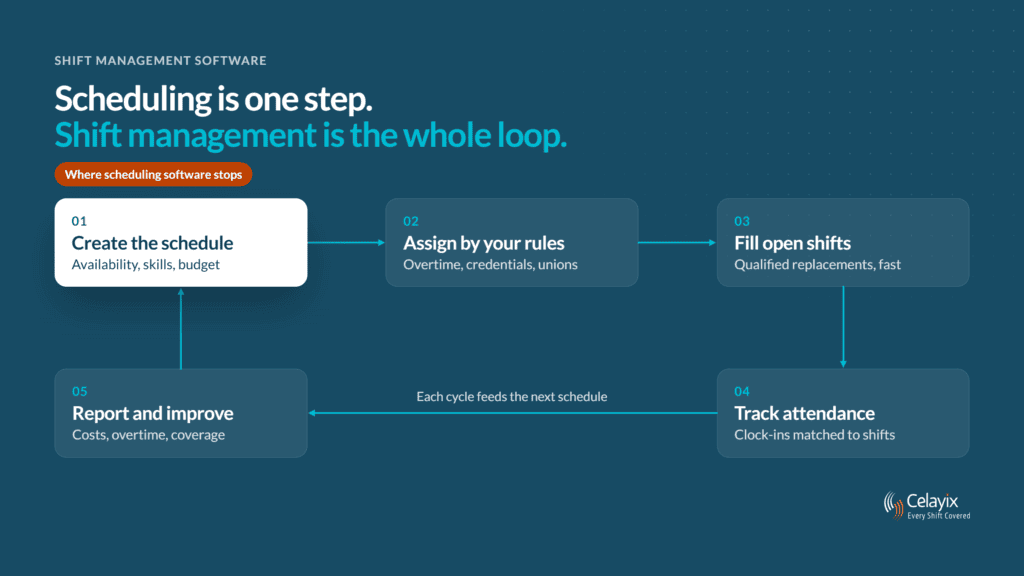
Shift management software ties together every stage of a shift, from building the schedule to producing payroll-ready time records. Most systems work in five stages:
- Schedule creation. Managers build schedules from employee availability, qualifications, labor budgets, and coverage needs. The software automates much of this, so a schedule that took hours can take minutes.
- Shift assignment. The system assigns employees based on your rules: qualifications, location, overtime limits, rest periods, and union agreements. Nobody has to cross-check by hand.
- Open-shift management. When someone calls off, or you need extra staff, the system finds qualified, available employees and offers them the shift. No phone trees or group texts.
- Time and attendance. Employees clock in and out against their scheduled shifts. That creates accurate records for payroll and flags late arrivals and no-shows as they happen.
- Managers see labor costs, overtime exposure, coverage gaps, and attendance across every site, and use that to improve the next schedule.
Key Features to Look For
These eight capabilities separate shift management software from a basic scheduling tool. Use them as your baseline when you compare products.
Rules-Based Scheduling
The software should know your rules and apply them every time a shift is assigned. Typical rules cover qualifications, availability, overtime thresholds, rest between shifts, seniority, union agreements, client requirements, and double-booking. Rules matter most when a scheduler is under pressure, which is exactly when manual checks get skipped.
Automated Open-Shift Filling
When a shift opens, the system should find employees who are qualified, available, and won’t trigger overtime, then offer them the shift. The best tools offer it to the lowest-cost qualified employee first and confirm the assignment without a round of phone calls. Our guide to filling open shifts fast shows what good looks like.
Shift Swaps and Employee Self-Service
Employees should be able to check schedules, set availability, request time off, pick up or bid on open shifts, and get notified of changes from their phones. Shift swaps and self-scheduling should follow the same rules as shifts a manager assigns, with manager approval where you need it.
Time and Attendance
Clock-ins should connect to scheduled shifts, so late arrivals, no-shows, and early departures show up as they happen. Mobile clock-in with geofencing or on-site time clocks help confirm employees are where they’re supposed to be. With scheduled and worked hours in one system, time and attendance review gets faster and fewer errors reach payroll.
Overtime and Labor Cost Controls
Overtime is easier to prevent than to explain after payroll. Look for warnings before an assignment pushes someone past a threshold, plus a view of projected overtime before the schedule is published. The rules have to match where you operate: the federal Fair Labor Standards Act sets a weekly baseline, and some states add daily overtime. More in our guide to overtime management for shift teams.
Compliance and Credential Tracking
Many shift-based industries require licenses, certifications, or training before an employee can work a shift. The software should block assignments when a credential is missing or expired, warn you before it expires, and keep an audit trail of scheduling decisions. Some cities also regulate scheduling. Under New York City’s Fair Workweek Law, for example, retail employers must give workers their schedules 72 hours before the first shift. Related reading: employee scheduling compliance and certification tracking.
Multi-Site Visibility and Reporting
If you run several sites, you need one view of coverage, open shifts, overtime, and attendance across all of them. Reports should quickly answer practical questions: which sites are short-staffed this week, where overtime is climbing, and which shifts are still open. More on scheduling across multiple locations.
Payroll and HR Integrations
Shift management software should share data with your payroll, HR, and ERP systems rather than replace them. Ask how employee records, pay rules, and approved hours move between systems, and how often. Every manual export is another chance for errors.
Automation and AI: What to Watch For
The newest shift management tools don’t stop at flagging problems. They can resolve them. Workflow automation can respond to an event, such as a dropped shift or a missed clock-in, by finding a replacement, sending offers, confirming the assignment, and updating the schedule.
AI assistants are also starting to connect to live workforce data. A manager can ask which sites are short-staffed this week or which shifts are heading into overtime, and get an answer without building a report.
This is useful, but control matters more than novelty. Before you let automation touch your schedule, check three things:
- The rules still apply. Automated and AI-initiated actions should follow the same qualification, overtime, and union rules as a human scheduler.
- You choose how much it does on its own. You should be able to set each workflow to notify you, wait for your approval, or act on its own.
- Every action is logged. An audit trail should show what changed, when, and why.
Who Needs Shift Management Software?

Simple tools work for small teams with stable schedules. Shift management software earns its keep when coordinating shifts by hand starts costing more than the software would. Common signs:
- You schedule across several sites or run 24/7 coverage.
- Filling a call-off takes more than a couple of phone calls.
- Overtime keeps climbing, and you find out after payroll.
- Certifications, licenses, or union rules decide who can work which shift.
- Schedulers spend hours every week building and fixing schedules.
- Timesheets regularly need corrections before payroll.
It’s most common in industries where a missed shift carries real risk:
- Security: Client sites need continuous coverage, and guards need valid licenses for each post. A missed post can put a client contract at risk.
- Healthcare (home health care and long-term care): Credentials have to match every assignment, fatigue rules limit back-to-back shifts, and caregiver continuity matters to clients and residents.
- Hospitality and events and venues: Demand swings with seasons and events, so coverage has to scale up and down quickly across departments.
- Manufacturing: Rotating shifts, union agreements, and certified operators for each line all shape the schedule.
How to Choose Shift Management Software
Not every product is built for the same level of complexity. Ask every vendor the same questions, and ask them to show you the answer in the product rather than describe it.
- Can it handle your real rules? List your toughest ones, such as certifications, overtime, rest periods, union seniority, and client requirements. Ask the vendor to show each rule blocking a bad assignment.
- How does it handle a 5 a.m. call-off? Ask to see the whole flow: the open shift, the qualified replacements, the offer, the confirmation, and the updated schedule.
- Will employees actually use the app? Have a few frontline employees try it. Self-service only helps if people use it.
- Is time and attendance connected to the schedule? Check whether no-shows appear right away and whether timesheets compare scheduled hours with worked hours.
- Does it prevent overtime or just report it? Look for warnings before an assignment, not a report after the pay period.
- Does it work with your payroll and HR systems? Ask which integrations exist today, what data moves, and how often.
- How are security and data handled? Ask for security documentation, such as a trust center or third-party audit reports, and how access is controlled.
- Who sets it up, and who answers when you call? Ask who configures your rules, how long implementation usually takes for an operation like yours, and what support looks like after launch.
Run the One-Real-Week Test
Standard demos make every product look capable. The better test is your own hardest week, run in the vendor’s system.
- Pick a difficult week. Choose one from the last few months with call-offs, overtime, and last-minute changes.
- Write down what happened. List the open shifts, who filled them, how long it took, and any overtime or rule problems.
- Send it ahead. Give every vendor the same week, your rules, and anonymized employee data before the demo.
- Ask them to run it live. Have the vendor build the week, then add two or three call-offs and watch how the system responds.
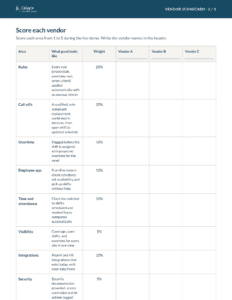
- Score every vendor the same way. Use the scorecard below.
| What you’re scoring | What good looks like |
| Rules | Every rule applied automatically, with no manual checks |
| Call-offs | A qualified, rule-compliant replacement confirmed in minutes |
| Overtime | Flagged before the shift is assigned |
| Employee experience | Frontline testers finish key tasks without help |
| Time and attendance | Scheduled and worked hours compared automatically |
| Visibility | Coverage and overtime for every site in one view |
| Setup and support | A clear plan for who configures your rules, and by when |
|
|
Want a ready-made version?Download the free vendor scorecard to log your real week, score vendors side by side, and check for red flags. It comes as a printable PDF or a spreadsheet. |
Red Flags to Watch For
- The demo only uses the vendor’s sample data.
- Rules are “handled during setup,” but no one can show them working.
- A call-off still ends with a list of names for a manager to phone.
- Overtime only shows up in reports after the pay period.
- The employee app is view-only.
- “Integration” means exporting a spreadsheet.
- No one can say who will configure your system or how long it will take.
How to Measure Results After You Switch
Record a baseline before you switch, so you can show what changed. These six metrics are a good start:
| Metric | What it tells you |
| Time to fill an open shift | How fast you recover from call-offs |
| Unfilled or late-filled shifts | Coverage risk and service impact |
| Overtime hours as a share of total hours | Whether scheduling is controlling labor costs |
| Hours spent building and editing schedules | Admin time saved |
| Schedule changes after publishing | How stable schedules are for employees |
| Timesheet corrections before payroll | How accurate your time data is |
Review them monthly for the first quarter, then quarterly.
How Celayix Handles Shift Management
Celayix is shift management software for complex, compliance-heavy operations, built on more than 25 years of workforce scheduling experience. It covers each feature above:
- Rules engine: Enforces overtime, qualification, union, availability, and double-booking rules on every assignment. We configure your rules with you, including overtime rules for each state you operate in.
- Automated filling: Autofill assigns shifts automatically based on your rules, and Shift Rescue finds qualified replacements when shifts are dropped.
- Employee app: The Celayix employee app covers availability, time-off requests, self-scheduling, shift bidding, geofenced clock-in, and timesheet review.
- Time and attendance: Clock-ins are captured against scheduled shifts, so worked hours can be checked against the schedule before payroll.
- Automation and AI: The Automated Workforce Engine runs workflows in notification, approval, or full-autonomy mode. Celayix AI Connect lets AI assistants like Claude check coverage, fill open shifts, and pull timesheets within your rules, with an audit trail.
- Integrations: Celayix works alongside your existing HR, payroll, and ERP systems.
Celayix customers have reported up to a 95% reduction in scheduling time and up to a 10% reduction in payroll costs. As Camil Dubuc, CEO of Genesis Security Group, put it: “Today, with our scheduling platform CELAYIX, we covered over 5,100 shifts in just a few minutes.”
Frequently Asked Questions About Shift Management Software
What Is Shift Management Software?
Shift management software is a system for scheduling, assigning, filling, and tracking employee shifts in one place. It combines scheduling, open-shift filling, an employee mobile app, time and attendance, and rules for overtime and compliance.
Is Shift Management Software the Same as Employee Scheduling Software?
Not quite. Employee scheduling software builds and publishes schedules. Shift management software also covers call-offs, replacements, attendance, overtime, and compliance after the schedule is published. Vendors use the terms loosely, so compare what the products do rather than what they’re called.
How Does Shift Management Software Reduce Overtime?
It warns you before an assignment pushes someone past an overtime threshold and fills open shifts with qualified employees who won’t go into overtime. Good systems let you set weekly and daily overtime rules for each state or province you operate in.
What Is Open-Shift Management?
Open-shift management is how you fill shifts that have no one assigned, whether from a call-off or extra demand. Shift management software finds qualified, available employees, offers them the shift through the app, and confirms the assignment.
Do We Need Shift Management Software If We Already Have an HR or Payroll System?
Often, yes. HR and payroll systems manage employee records and pay. Shift management software manages coverage: who works each shift, whether they’re qualified, and what happens when plans change. The two should share data.
How Much Does Shift Management Software Cost?
Pricing usually depends on how many employees you schedule and which features you need. Many vendors price per employee per month. Ask for quotes that include implementation, integrations, and support, not only the license.
How Long Does It Take to Implement?
It depends on how many sites you have, how complex your rules are, and which systems you need to connect. Ask each vendor for a timeline based on your setup, and find out who does the configuration work.
See It With Your Own Schedule
The fastest way to judge shift management software is to watch it handle your real week. Bring one week of schedules, call-offs, and overtime, and we’ll show you how Celayix would cover it.


