

Open shifts can quickly become a scheduling headache.
When an employee drops a shift, managers need to find a qualified replacement — fast. That often means checking availability, reviewing qualifications, considering overtime, contacting employees, and manually updating the schedule.
Celayix Shift Rescue changes that process.
Powered by the Celayix Automated Workforce Engine, Shift Rescue helps organizations fill open shifts faster by automatically identifying qualified, available replacement candidates and taking the next action based on your rules.
That action can be as simple as sending a manager a list of recommended employees. Or, when your organization is ready for greater automation, Shift Rescue can recommend a replacement for approval or automatically assign the best-fit employee.
The result?
Faster open shift coverage. Less manual work. Fewer scheduling surprises.
From Find Replacement to Shift Rescue
Find Replacement was designed to eliminate one of the most frustrating parts of employee scheduling: manually searching through your workforce when someone can no longer work a shift.
Instead of working through a call list or messaging employees one at a time, Celayix can evaluate employees against criteria such as availability, qualifications, and overtime restrictions to identify appropriate replacements.
That capability remains at the heart of Shift Rescue.
The difference is what happens next.
With the Celayix Automated Workforce Engine, a dropped shift can trigger a workflow automatically. Shift Rescue can identify eligible replacement candidates and then take the next action according to your organization’s configured rules.
In other words, the workflow doesn’t have to stop at “Here are your options.”
It can help move the shift toward “Covered.”
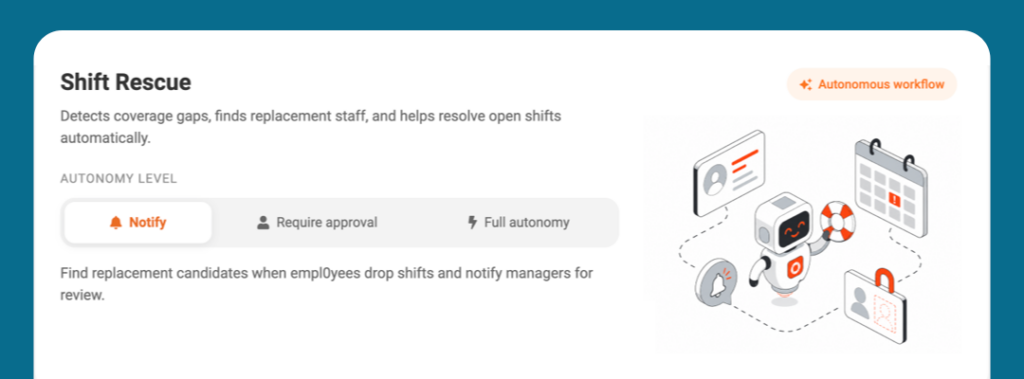
How Shift Rescue Works
Shift Rescue begins when an employee drops a shift.
The workflow then evaluates potential replacements using the scheduling criteria configured by the organization. Depending on the setup, those criteria can include employee qualifications, availability, overtime status, and other scheduling rules.
Celayix’s employee search rules can also determine how it prioritizes eligible employees, helping organizations align replacement decisions with operational requirements.
Once Shift Rescue identifies suitable replacements, it can proceed in one of three ways.
1. Recommend Replacement Candidates
Sometimes you want automation to do the searching while leaving the final decision to a manager.
In this mode, Shift Rescue identifies appropriate candidates and sends the recommendations to the manager for review.
The scheduler gets the information needed to decide without manually searching through employees first.
2. Recommend a Replacement and Request Approval
The next level removes another step from the process.
Shift Rescue can identify the recommended replacement and prepare the proposed change, but wait for manager approval before completing it.
This lets organizations automate more of the replacement process while keeping a human decision point where it matters.
3. Automatically Assign the Replacement
For organizations that are comfortable delegating the entire process, Shift Rescue can operate autonomously.
Celayix identifies the appropriate replacement according to the organization’s configured rules and automatically carries out the permitted reassignment.
No manual search. No waiting for someone to work through a list of candidates. No need for a manager to make a routine decision when the rules have already determined what should happen.
Control or Delegate: You Decide
Autonomous workforce operations shouldn’t mean giving up control.
That is why Celayix workflows support different levels of autonomy. An organization can decide which processes should simply provide information, which require approval, and which can execute automatically.
The three levels are:
- Notification: Celayix analyzes the situation and provides recommendations while the manager remains responsible for taking action.
- Approval: Celayix prepares the recommended action but waits for authorization before proceeding.
- Full Autonomy: Celayix executes permitted actions automatically within the organization’s predefined rules.
Organizations can therefore introduce automation at a level that fits their processes today and increase autonomy as appropriate.
That flexibility is particularly important in complex shift-based environments, where staffing decisions may need to account for qualifications, union or seniority requirements, overtime limits, double-booking prevention and other operational constraints.
Why Faster Shift Rescue Matters
A dropped shift might look like one small schedule change, but its impact can quickly spread.
For a security company, it could mean an uncovered post. In healthcare, it could affect continuity of care. In hospitality, events, and field operations, an unexpected gap can put pressure on the rest of the team or affect service delivery.
The traditional response also creates administrative work. Managers must identify candidates, check their suitability, contact employees, wait for responses, and update the schedule, often while managing other operational priorities.
Shift Rescue is designed to reduce that coordination.
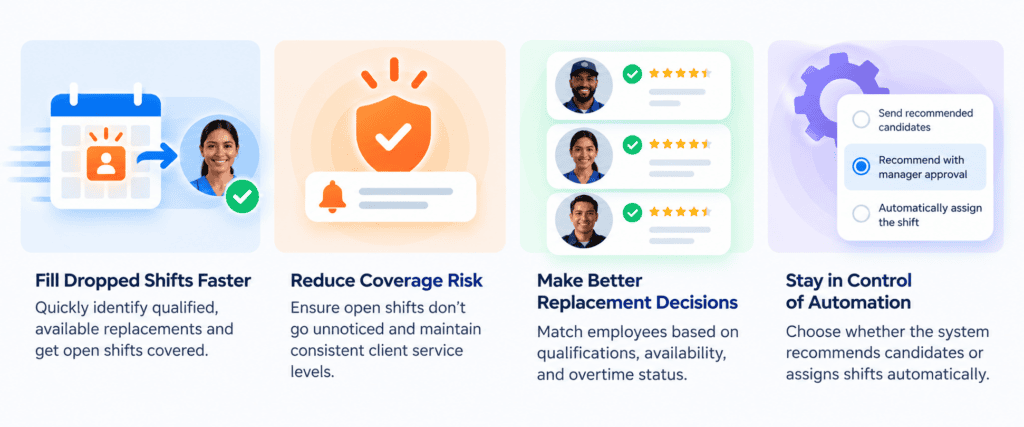
Fill Dropped Shifts Faster
Shift Rescue can begin working as soon as the triggering event occurs.
Instead of waiting for a scheduler to notice the open shift and begin searching for a replacement, the workflow can immediately start the configured replacement process.
That helps teams respond to coverage problems before they become bigger operational problems.
Reduce the Risk of Open Shifts Going Unnoticed
Notifications are useful, but they still depend on someone seeing the alert and taking action.
Automated workflows can go further.
Rather than simply telling a manager that a shift has been dropped, Shift Rescue can begin executing the response defined by the organization. This helps turn schedule monitoring into a repeatable operational process.
Make Replacement Decisions Using Your Rules
Filling a shift quickly matters, but assigning just anyone isn’t the goal.
Celayix can use established scheduling rules to identify eligible employees based on factors such as qualifications, availability, and overtime status.
That can also have implications for labor costs. For example, in the United States, covered non-exempt employees generally must receive overtime pay after 40 hours in a workweek under the Fair Labor Standards Act. Organizations therefore have good reason to consider overtime implications before assigning replacement shifts. The U.S. Department of Labor provides further guidance on federal overtime requirements.
Shift Rescue brings those workforce considerations into the replacement workflow rather than leaving managers to check them manually every time.
Reduce Repetitive Scheduling Work
Finding replacements is necessary work, but much of the process is repetitive.
A scheduler may follow essentially the same steps every time someone drops a shift: find eligible people, compare the candidates, determine the preferred replacement, communicate the change, and update the schedule.
Autonomous workflows turn those repeated steps into a defined process.
Managers can spend less time chasing routine coverage changes and more time managing the exceptions and decisions that require their attention.
Automation With Guardrails
An important distinction exists between automating workforce decisions and making uncontrolled decisions.
Shift Rescue operates according to configured scheduling rules and workflow settings. Organizations determine the criteria used to identify replacements and the level of authority given to the workflow.
Celayix workflows can also include approval requirements and scheduling validations. Even when a proposed reassignment is approved, applicable scheduling validations must still be satisfied before the change can be completed.
This approach provides a practical path to autonomous workforce operations: automate what can be standardized while maintaining oversight where required.
The Next Evolution of Employee Scheduling
Find Replacement changed how managers fill shifts by helping them quickly identify suitable employees.
Shift Rescue builds on that foundation by automating what happens around and after that search.
A dropped shift can trigger the workflow. The system can identify appropriate replacements. Your rules determine who qualifies and how candidates are prioritized. Then Celayix can recommend an action, request approval or carry out the permitted action automatically.
That’s the broader shift behind the Celayix Workforce Management Platform: moving from software that simply helps people manage workforce problems to software that can help resolve those problems within defined operational rules.
Shift Rescue is one of the first autonomous workflows available through the Celayix Automated Workforce Engine, alongside Overtime Guardian.
The goal is simple:
Faster coverage. Less manual work. Fewer scheduling surprises.
Turn Dropped Shifts into Resolved Shifts
Your scheduling software already knows when a shift has been dropped.
With Shift Rescue, it can also know what should happen next.
Whether you want a ranked list of replacement candidates, manager approval before reassignment, or a workflow that handles eligible replacements autonomously, you decide how much control to keep and how much work to delegate.
Learn more about Celayix Automated Workforce Management and see how autonomous workflows can help your organization move from workforce alerts to workforce action.