
Workforce management scheduling is the process of assigning the right employees to every shift, based on expected demand, availability, qualifications, labor rules, and cost. It sits at the center of workforce management: forecasts feed it, and time and attendance and payroll depend on its output.
For shift-based operations such as security, home care, events, and manufacturing, good scheduling comes down to coverage, compliance, and cost. Every post or visit is filled by someone qualified, every assignment follows overtime, union, and local scheduling rules, and the schedule meets both at the lowest labor cost. This guide explains how it works and what to look for in workforce management scheduling software.
Where Scheduling Fits in Workforce Management

Workforce management (WFM) covers how an organization plans, deploys, tracks, and pays its hourly workforce. Scheduling is the step where plans become named people on specific shifts. In most operations, the cycle runs in four steps:
- Forecast demand. Estimate how many people, with which skills, each site or service needs. In shift-based work, this usually comes from client contracts, post orders, care plans, or event bookings, not call volume.
- Build the schedule. Match employees to shifts based on availability, qualifications, labor rules, and cost.
- Track time and attendance. Record when people actually start and stop, and flag no-shows, late arrivals, and missed breaks.
- Pay and bill. Turn approved hours into payroll and, for contract services, client invoices.
Each step depends on the one before it. A schedule built without accurate demand leaves posts uncovered, and time records that don’t match the schedule turn payroll into a reconciliation exercise. That is why scheduling software is most useful when it connects to time and attendance and payroll rather than standing alone.
Workforce Management vs. Scheduling Tools vs. Employee Management
These three categories overlap, and vendors use the labels loosely. The practical difference is how much of the plan-to-pay cycle each one covers.
| Scheduling tool | Workforce management platform | Employee management (HRIS) | |
| Main job | Build and share shift schedules | Plan, schedule, track, and control labor across sites | Keep employee records and run HR processes |
| Typical features | Shift calendar, availability, shift swaps or open shifts, notifications | Rules-based scheduling, replacement finding, time and attendance, overtime and compliance controls, labor-cost reporting, payroll and billing integration | Employee profiles, onboarding, benefits, performance reviews, often payroll |
| Scheduling rules | Few or none; the scheduler checks rules by hand | Enforced automatically: qualifications, overtime, union rules, rest periods | Usually none |
| Best fit | One site, simple shifts, small team | Multi-site, regulated, unionized, or high-volume shift work | HR record-keeping for any size |
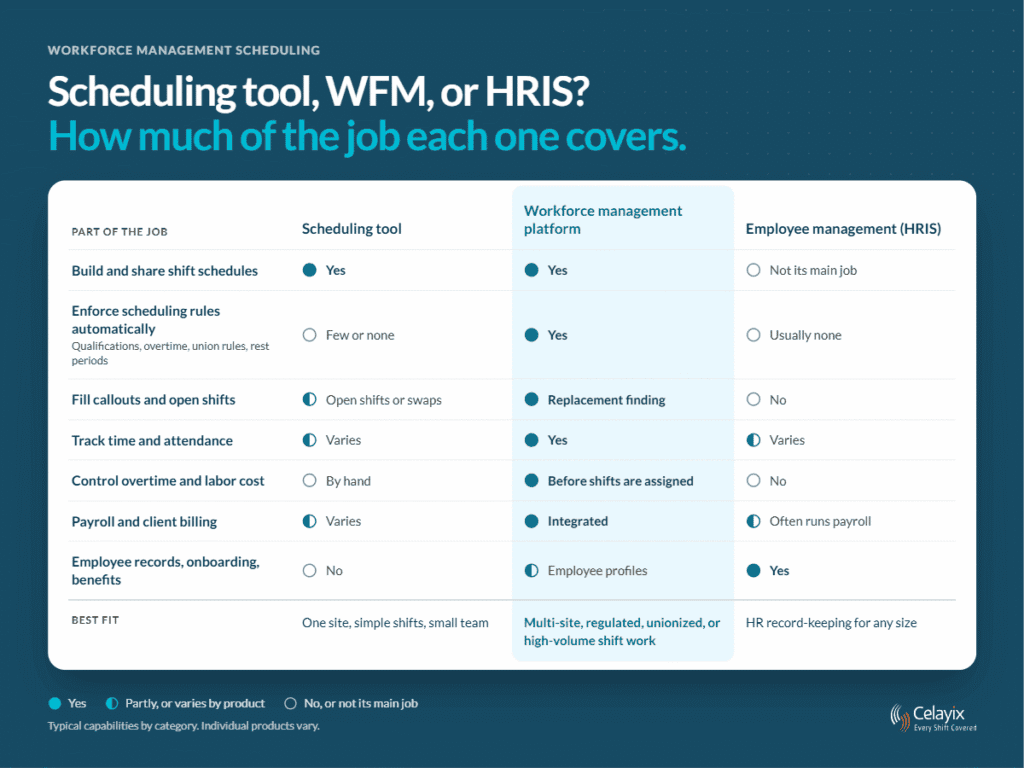
Many organizations run both an HRIS and a workforce management platform, connected through an integration so employee data flows one way and approved hours flow back to payroll. The question is not which category is “best” but where your scheduling breaks down: if the schedule is simple and the pain is communication, a scheduling tool may be enough. If the pain is coverage gaps, overtime, or compliance across sites, you need workforce management.
Shift-Based vs. Contact-Center Scheduling
Search for workforce management scheduling, and much of what you’ll find is written for contact centers. The principles overlap, but the work is different enough that the software usually is too.
- Contact-center scheduling starts from forecasted call, chat, and email volume in 15- or 30-minute intervals. It staffs agents to a service-level target, then tracks how closely they follow the schedule through the day.
- Shift-based scheduling starts from fixed coverage: a security post, a home care visit, a banquet, a production line. It staffs qualified people at each site, often with travel between sites, overtime limits, union rules, and client billing attached.
This guide covers the second kind. If your problem is matching agents to interaction volume, contact-center workforce management software is the better fit.
What a Workforce Management Scheduler Handles Day to Day
Whether the scheduler is a person, software, or both, the job comes down to five recurring tasks. Software earns its place by taking the rule-checking off the person so they can focus on judgment calls.
Matching people to shifts by rule
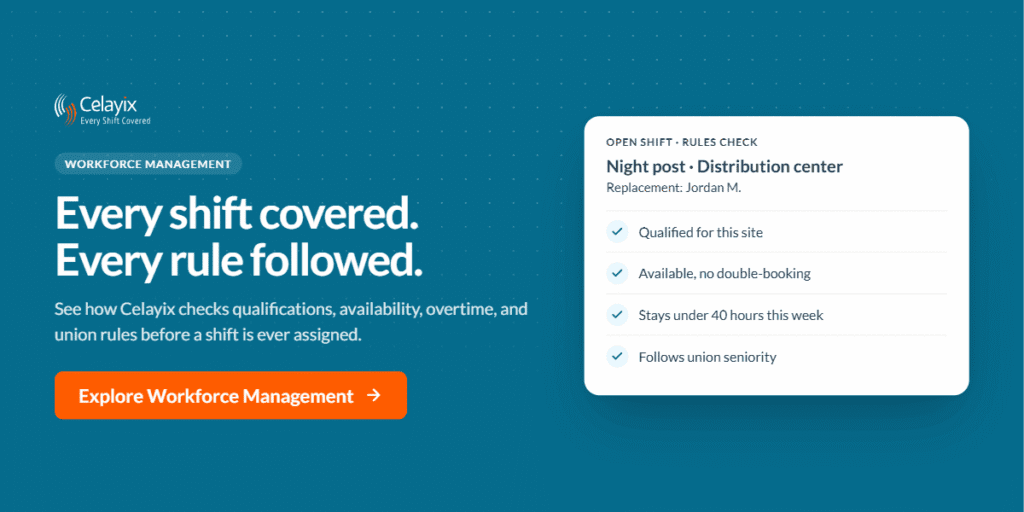
Every assignment has to fit the employee’s availability and qualifications, the site’s requirements, and any union seniority or rotation rules, without double-booking anyone. Doing that by hand works for a dozen employees. With hundreds of shifts a week across multiple sites, a rules-based scheduling engine that automatically checks each assignment keeps the schedule covered and compliant.
Filling callouts and open shifts
Sick calls, no-shows, and new client requests turn a finished schedule into open shifts every day. The fastest way to fill them is to see, in one list, who is qualified, available, and within their hours, then offer the shift through an employee app. Celayix does this with Shift Rescue, plus shift bidding and self-scheduling for shifts posted in advance. For a step-by-step comparison, see how a 2 a.m. callout plays out with and without a connected system.
Controlling overtime before it happens
Under the FLSA, covered non-exempt employees earn at least one and a half times their regular rate for hours over 40 in a workweek (U.S. Department of Labor). Most unplanned overtime starts with a single assignment made without seeing the employee’s weekly hours. Good scheduling shows projected hours and cost before assigning a shift, and spreads extra hours fairly instead of giving them to whoever answers first.
Following scheduling and rest rules
Some jurisdictions regulate the schedule itself, not just the pay. Oregon’s predictive scheduling law, for example, applies to retail, hospitality, and food service employers with at least 500 employees worldwide. It requires written schedules at least 14 calendar days in advance, 10 hours of rest between shifts unless the worker agrees, and penalty pay for late changes (Oregon BOLI). New York City’s Fair Workweek law also requires 14 days’ notice for fast food workers, plus premiums for changes and the right to decline back-to-back closing and opening shifts (NYC DCWP). If you operate where these laws apply, your scheduling system needs to track notice dates and rest periods, not just shifts.
Keeping the schedule and the timesheet in sync
A schedule is a plan; the timesheet is what happened. When both live in the same system, missed clock-ins, late arrivals, and unscheduled hours show up as same-day exceptions instead of payroll surprises two weeks later.
How to Choose Workforce Management Scheduling Software
Test any platform against your hardest week, not the vendor’s demo data. Our guide to choosing employee scheduling software covers seven evaluation areas in depth. These five questions separate a workforce management platform from a scheduling tool.
- Does it enforce your rules, or just display them? Ask the vendor to configure one of your real rules in the demo: a union seniority clause, a site qualification, an overtime cap, or a rest period.
- What happens when a shift drops at 2 a.m.? Watch who sees the open shift, how it finds a qualified replacement, and how the offer reaches employees.
- Do scheduled hours, actual hours, and pay live in one place? Look for schedule-versus-actual exceptions and direct payroll and billing integration, not exports someone has to reconcile.
- Can you see labor cost by site before you publish? Overtime is cheapest to prevent while the schedule is still a draft.
- What does the AI actually do? “AI-powered” covers everything from a chat box to fully automated changes. Ask:
- Does it answer questions, recommend actions, or take them?
- Can you choose, per workflow, whether it only notifies, waits for approval, or acts on its own?
- Does every AI action pass through the same rules a human scheduler would?
- Is there an audit trail of what it did and why?
- Can your team reach scheduling data from the AI assistants it already uses?
In Celayix, those answers map to the scheduling rules engine and Find Replacement, time and attendance, and the Automated Workforce Engine. Its workflows run in notification, approval, or full-autonomy mode, and it records every action. Ask Celayix answers scheduling questions inside the platform, and Celayix AI Connect links Celayix data to assistants such as Claude through the Model Context Protocol.
Frequently Asked Questions
What is workforce management scheduling?
Workforce management scheduling is the process of assigning employees to shifts based on demand, availability, qualifications, labor rules, and cost. It is the part of workforce management that turns a staffing plan into a working schedule.
What does a workforce management scheduler do?
A workforce management scheduler builds and maintains the schedule: matching people to shifts, filling callouts and open shifts, preventing unplanned overtime, and keeping assignments within union, overtime, and local scheduling rules. The term can mean the person in that role or the software that does the rule-checking.
How are forecasting and scheduling connected?
Forecasting estimates how many people with which skills you need, and scheduling assigns named employees to meet that need. In shift-based operations, demand usually comes from client contracts, post orders, care plans, or event bookings, so the forecast is often a known coverage requirement rather than a volume prediction.
What is the difference between workforce management software and scheduling software?
Scheduling software builds and shares shift schedules. Workforce management software also enforces labor rules, tracks time and attendance, controls overtime, and connects hours to payroll and billing across sites.
What are predictive scheduling laws?
Predictive scheduling, or fair workweek, laws require covered employers to post schedules in advance and pay a premium for late changes. Oregon and New York City, for example, require 14 days’ notice for covered workers, and coverage is mostly limited to retail, hospitality, and food service.
Can AI build workforce schedules?
Yes, within limits. AI can answer scheduling questions, suggest replacements, and run routine workflows, but compliance decisions such as overtime caps and qualifications should still pass through a rules engine with an audit trail.
Schedule for coverage, compliance, and cost
Workforce management scheduling works when the schedule, the rules, and the time record are the same system, so problems surface while they are still cheap to fix. Celayix has built scheduling for complex, multi-site shift operations in security, healthcare, hospitality, and events for more than 25 years.