
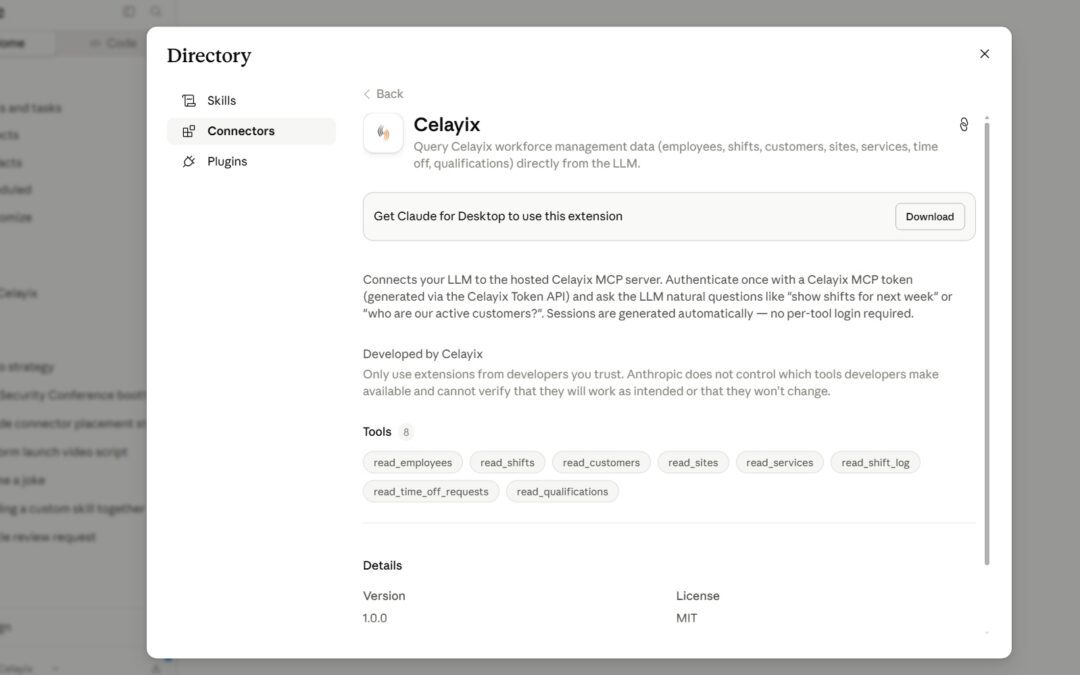
You can now connect Celayix to Claude without leaving Claude.
Celayix AI Connect is listed in Claude’s connector directory, giving Celayix customers a simpler way to connect workforce data to Claude. Find the Celayix connector, click Connect, and follow the guided setup: no API token to generate and no configuration to copy between apps.
Once connected, Claude becomes a plain-English window into your live Celayix workforce data. For workforce managers, scheduling supervisors, payroll administrators, and billing teams, that means a faster path from question to answer.
More broadly, it reflects a bigger shift in AI workforce management: instead of navigating through software to find the data, you can start with the question.
Ask Questions About Your Workforce Data in Plain English
Business software has always trained us to adapt to the application. To find an answer, you first learn the menus, filters, fields, and which report contains what.
Conversational AI reverses that. Instead of translating a business question into a sequence of software actions, you can ask the question in plain English and let Claude retrieve the relevant workforce information.
Celayix AI Connect gives Claude access to your employees, shifts, sites, customers, time-off, and qualifications so that you can ask things like:
- “Who’s scheduled at the downtown site tomorrow?”
- “Which employees have approved time off next week?”
- “Which employees are assigned to this customer?”
- “Which guards hold a valid first aid certification?”
No report builder, no query syntax, no clicking through screens to piece an answer together.
That matters most for people who don’t use the workforce management platform every day: a finance employee who occasionally needs scheduling context, a billing team member confirming hours or assignments, or a new supervisor still learning where information lives.
They don’t need to know where the data is stored. They can focus on what they need to know and ask for it.
Why the Celayix Claude Connector Matters
The capability behind Celayix AI Connect is an MCP Server, which uses the Model Context Protocol. This open standard provides AI applications with a common way to connect to external systems.
That capability has been available to Celayix customers for a while. But connecting an AI client previously required generating a secure token in Schedule Xpress and entering it manually into the AI client.
For a technical administrator, that’s a minor step. For a scheduling manager or payroll specialist who has never configured an AI client, the difference can be between knowing an AI capability exists and actually using it.
The Claude connector directory removes much of that friction. For users with the appropriate access, Celayix AI Connect can now be discovered and connected directly inside Claude through a guided process.
That makes natural-language access to workforce data easier to adopt across more roles and teams.
The value of AI workforce management is not just what the technology can do. It’s how easily people can use it in their day-to-day work.
Connect Workforce Data with the Bigger Picture
Organizations rarely make decisions based on a single system.
Workforce information lives in Celayix. Financial data, customer details, and internal knowledge live elsewhere. Answering questions across those systems has usually meant exports, spreadsheets, and manual reconciliation.
Because Celayix AI Connect runs inside Claude alongside other connected data sources, you can bring workforce data into broader business analysis in a single conversation.
Leadership can look at staffing next to operational results. Finance can pull workforce context into a labor cost review. Operations teams can compare scheduling and workforce activity with information from other connected systems.
The long-term opportunity is not just faster workforce lookups. It’s a more connected view of the business.
As organizations adopt more AI tools, such cross-system access becomes increasingly important. Workforce data doesn’t have to remain isolated inside a single application. It can become part of the same AI-powered workflows people use to understand operations, investigate issues, and make decisions.
How to Connect Celayix to Claude
- In Claude, open the connector directory.
- Search for Celayix AI Connect.
- Click Connect and follow the guided setup to link your Celayix account.
- Ask your first question about your workforce data.
You’ll need the appropriate Celayix and Claude access to complete the connection.
Try Celayix AI Connect This Week
If you’re a Celayix customer, pick one workforce question your team answers by hand every week and ask Claude instead.
It could be a scheduling question, a time-off lookup, a qualification check, or another routine request. Starting with a real task is one of the simplest ways to see how conversational access to workforce data can fit into your day-to-day operations.
Learn more about Celayix AI Connect and how Celayix is connecting workforce management data with the next generation of AI tools.
 https://claude.ai/directory/connectors/ant.dir.gh.celayix-open-source.celayix-mcp