

Organizations that operate around the clock face a scheduling challenge: how do you provide reliable coverage without assigning the same employees to nights, weekends, or other less desirable shifts indefinitely?
A rotating shift schedule is one solution.
Instead of permanently assigning employees to one shift, a rotating schedule moves employees through different working hours according to a defined pattern. An employee might work days for one part of the rotation, have scheduled time off, and then move to nights.
Rotating shifts are common in healthcare, security, manufacturing, hospitality, emergency services, and other industries where operations extend beyond a traditional 9-to-5 workday.
When designed well, a rotating schedule can distribute shifts more fairly, provide predictable coverage, and give employees more variety. However, rotating between different working hours can also create fatigue, sleep disruption, and work-life balance challenges.
This guide explains how rotating shift schedules work, the most common rotation patterns, their advantages and disadvantages, and how to build a rotation that works for your organization.
What Is a Rotating Shift Schedule?
A rotating shift schedule is a work schedule in which employees periodically move between different shifts.
For example, an employee might work:
- Day shifts during one part of the schedule
- Evening shifts during another
- Night shifts during another
- Scheduled days off between rotations
The rotation can occur weekly, every few weeks, or on a longer repeating cycle.
This differs from a fixed shift schedule, where employees generally work the same hours on an ongoing basis. A fixed night-shift employee, for example, continues working nights instead of switching to days periodically.
Rotating schedules can be particularly useful for organizations that need 24-hour shift coverage because multiple employees or teams can share responsibility for nights, weekends, and other difficult shifts.
How Do Rotating Shifts Work?
Rotating schedules divide employees into teams or crews and move those groups through a predefined sequence of working and non-working periods.
Imagine an organization with day and night shifts.
Instead of assigning Team A permanently to days and Team B permanently to nights, the teams rotate. Team A may work days during one cycle and nights during the next, while Team B does the opposite.
The schedule eventually repeats, allowing employees and managers to know their expected shifts in advance.
Rotations can vary significantly depending on:
- Hours of operation
- Number of employees
- Required staffing levels
- Shift length
- Employee qualifications
- Workload
- Overtime rules
- Employee availability
- Required rest periods
- Local labor requirements
No single rotating schedule works for every organization. The goal is to find a pattern that provides adequate coverage while considering employee workload, safety, predictability, and operational requirements.
Rotating Shifts vs. Fixed Shifts
The main difference between rotating and fixed shifts is whether an employee’s working hours change periodically.
With a fixed schedule, an employee generally remains on the same shift. For example, someone assigned to the 7 a.m. to 3 p.m. shift continues working those hours.
With a rotating schedule, that employee may eventually move to an afternoon or night shift according to a repeating pattern.
Neither approach is automatically better.
Fixed schedules offer consistency and can make it easier for employees to organize sleep, childcare, commuting, and other responsibilities. Rotating schedules can distribute desirable and undesirable shifts more evenly while helping organizations maintain continuous coverage.
The right choice depends on the workforce and the organization’s operational needs.
Common Types of Rotating Shift Schedules
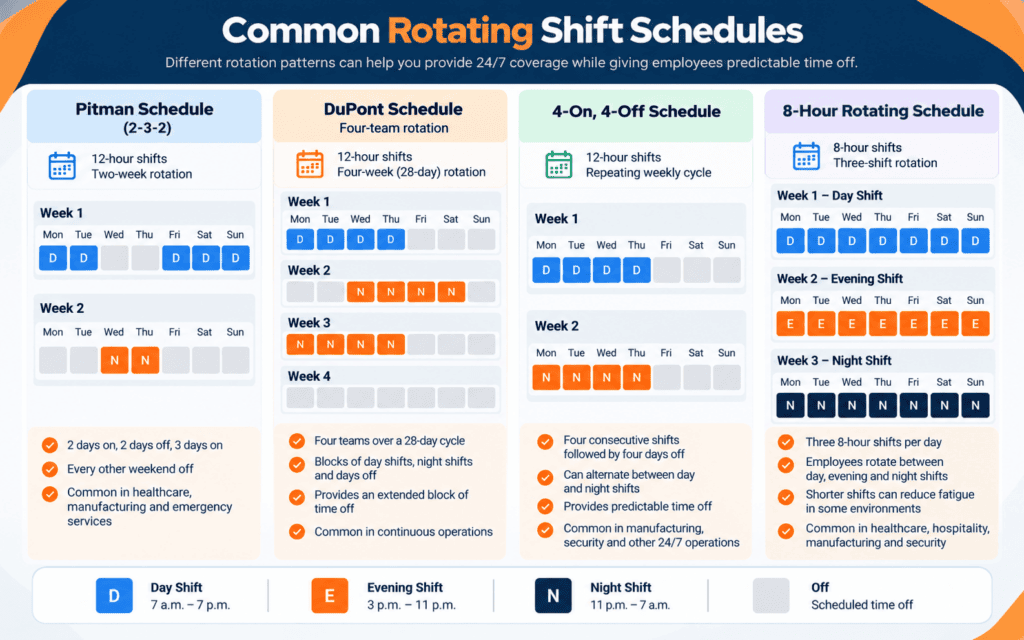
Organizations can build rotations in many different ways. Common patterns include the Pitman schedule, DuPont schedule, 4-on/4-off schedule, and other 8- or 12-hour rotations.
Pitman Schedule
The Pitman schedule, sometimes called a 2-3-2 schedule, is commonly used for operations requiring 24/7 coverage.
Employees typically work 12-hour shifts on a two-week pattern that alternates workdays and days off.
A typical sequence might look like:
Week 1:
Work 2 days → Off 2 days → Work 3 days
Week 2:
Off 2 days → Work 2 days → Off 3 days
One benefit of this pattern is that employees receive regular blocks of time off and every other weekend off.
Organizations can use multiple crews to maintain coverage while teams move through the rotation.
DuPont Schedule
The DuPont schedule is another 12-hour rotating schedule commonly associated with continuous operations.
It uses four teams across a 28-day cycle. Employees rotate through blocks of day shifts, night shifts, and days off.
A distinguishing feature is an extended block of days off during the cycle.
The trade-off is complexity. Employees may work several long shifts within relatively short periods, making fatigue management and careful scheduling especially important.
4-On, 4-Off Schedule
A 4-on, 4-off schedule generally involves employees working four consecutive shifts followed by four days off.
Teams can alternate between day and night shifts as the rotation progresses.
The pattern is relatively easy to understand and gives employees predictable blocks of time away from work. However, because the schedule does not follow a traditional Monday-to-Friday week, employees may regularly work weekends and holidays.
2-2-3 Rotating Schedule
A 2-2-3 schedule organizes work into alternating groups of two and three shifts.
For example:
Work 2 days → Off 2 days → Work 3 days → Off 2 days → Work 2 days → Off 3 days.
Employees can then rotate between days and nights depending on the organization’s scheduling requirements.
Like the Pitman schedule, the pattern can provide extended time off while maintaining continuous coverage.
8-Hour Rotating Shifts
Not every rotation requires 12-hour shifts.
Organizations can divide 24 hours into three 8-hour shifts, such as:
- 7 a.m. to 3 p.m.
- 3 p.m. to 11 p.m.
- 11 p.m. to 7 a.m.
Employees then rotate between those shifts according to a defined schedule.
Shorter shifts can be useful in physically or mentally demanding environments, although three daily shifts may require more handoffs and scheduling coordination than a two-shift, 12-hour system.
What Are the Advantages of Rotating Shifts?
Rotating schedules can provide meaningful benefits when they are designed around the needs of both the organization and its employees.
1. Fairer Distribution of Shifts
Some shifts are naturally more desirable than others.
For example, many employees would rather work during the day than overnight. Weekends and holidays can also be difficult to staff.
A rotating schedule distributes these shifts among employees instead of permanently assigning the least desirable hours to one group.
This can create greater transparency around scheduling decisions and reduce perceptions of favoritism.
2. Reliable Coverage
Organizations operating 24/7 need qualified employees available at all times.
A structured rotation helps managers plan coverage across days, evenings, nights, weekends, and holidays.
For industries such as healthcare, security, manufacturing, and hospitality, maintaining that coverage is essential to keeping operations running.
3. Skills Can Be Distributed Across Shifts
A rotating schedule can help prevent experienced or highly qualified employees from becoming concentrated on a single shift.
Organizations can distribute employees with different qualifications and experience throughout the rotation, helping maintain an appropriate skill mix across operating hours.
Employees may also gain experience working under different conditions and alongside different colleagues.
4. More Variety
Working the same hours with the same responsibilities can become repetitive for some employees.
Rotating schedules introduce more variety by exposing employees to different shifts, workloads, colleagues, customers, and responsibilities.
That variety can also help employees better understand how different parts of an organization’s daily operation fit together.
5. Longer Blocks of Time Off
Some rotating schedules use longer shifts in exchange for fewer working days.
A 12-hour rotation, for example, can provide several consecutive days off.
Whether employees prefer this arrangement depends on the individual and the job’s demands, but longer periods away from work are one reason some employees prefer compressed schedules.
What Are the Disadvantages of Rotating Shifts?
Rotating schedules also have important drawbacks. Employers should consider them before implementing a rotation.
1. Sleep and Circadian Rhythm Disruption
The human body naturally follows a roughly 24-hour circadian cycle. Repeatedly moving between daytime and nighttime work can disrupt that cycle.
The National Institute for Occupational Safety and Health (NIOSH) notes that shift work and long working hours can increase health and safety risks by disturbing sleep and circadian rhythms.
Night work can be particularly challenging because employees work when their bodies are naturally prepared for sleep and try to sleep during daylight hours.
For employers, this means rotation design should consider adequate recovery time rather than focusing exclusively on coverage.
2. Fatigue
Long, irregular, or rapidly changing shifts can contribute to fatigue.
The Occupational Safety and Health Administration (OSHA) identifies rotating and irregular shifts among the work schedules that may contribute to worker fatigue.
Fatigue is more than an employee comfort issue. Depending on the work environment, reduced alertness can contribute to errors, injuries, accidents, and reduced performance.
Employers should pay particular attention to fatigue in safety-sensitive roles.
3. Work-Life Planning Can Be More Difficult
Consistency is one of the biggest advantages of fixed shifts.
An employee who always works the same hours can organize childcare, transportation, appointments, family commitments, and sleep around a predictable routine.
Rotating shifts introduce another variable.
Predictable rotations published well in advance can help, but some employees will still prefer fixed working hours.
4. Rotations Can Be Difficult to Manage
Rotating schedules become complicated when managers must simultaneously consider:
- Availability
- Employee qualifications
- Time off
- Overtime
- Shift preferences
- Labor costs
- Rest periods
- Last-minute absences
- Union or organizational rules
The more employees, locations, qualifications, and scheduling rules involved, the more difficult it becomes to maintain the rotation manually.
5. Not Every Employee Adjusts the Same Way
No one reacts the same way to shift work.
Some employees may prefer compressed or rotating schedules, while others struggle with changing sleep patterns or personal responsibilities.
NIOSH notes that individuals differ in their ability to adjust to shift work and recommends giving workers some control over their schedules where practical.
Employee feedback should therefore be part of schedule design.
Which Industries Use Rotating Shift Schedules?
Rotating schedules are particularly useful in industries that require extended or continuous coverage.
Healthcare
Hospitals, long-term care facilities, emergency departments, and other healthcare organizations require employees around the clock.
Rotating schedules can help distribute nights and weekends while maintaining appropriate staffing levels and qualifications.
Security
Security companies often need guards and other personnel at client locations 24 hours a day.
Because staffing requirements can change across sites and contracts, security scheduling can involve complex combinations of availability, qualifications, overtime limits, and coverage requirements.
Manufacturing
Factories and production facilities may operate continuously to maximize equipment utilization and meet production targets.
Rotating crews allow production to continue while individual employees receive scheduled time away from work.
Hospitality
Hotels and other hospitality businesses serve guests outside normal business hours.
Front desk, housekeeping, maintenance, food service, and other teams may require different levels of coverage throughout the day and night.
Emergency and Essential Services
Emergency response, utilities, transportation, and other essential services frequently need continuous staffing.
Rotations help ensure qualified employees are available outside standard working hours.
How to Create a Rotating Shift Schedule
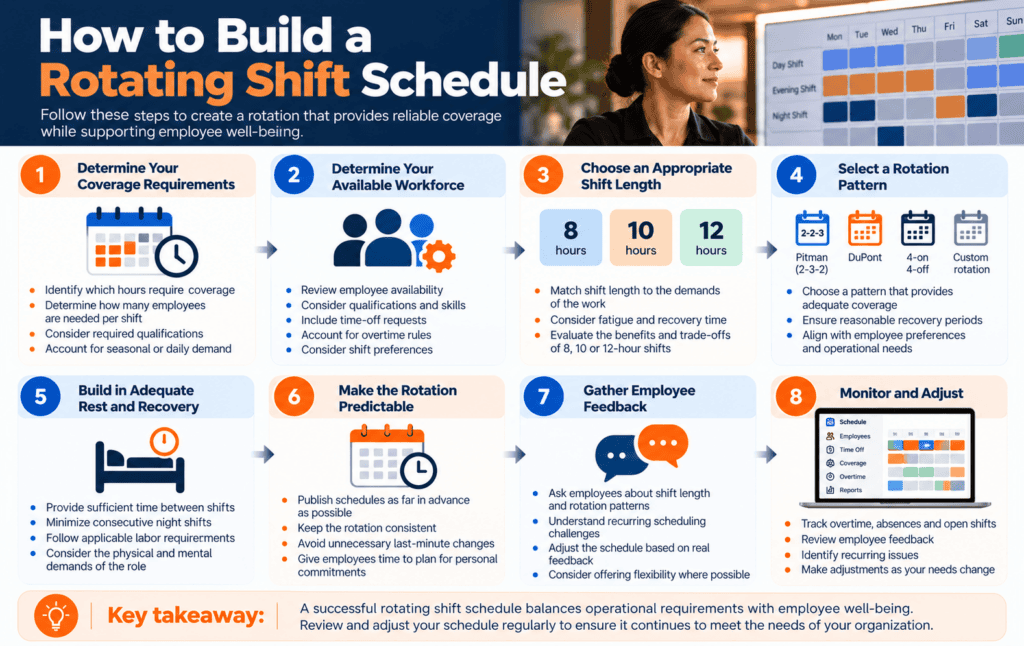
A successful rotation starts with operational requirements—not with choosing a popular shift pattern.
Step 1: Determine Your Coverage Requirements
Start by identifying when you need employees.
Ask:
- Which hours require coverage?
- How many employees are required per shift?
- Which positions must always be present?
- What qualifications or certifications are required?
- Does demand change by hour, day, or season?
This creates the foundation for the schedule.
Step 2: Determine Your Available Workforce
Next, understand which employees are available to meet those requirements.
Consider:
- Employee availability
- Qualifications
- Contracted hours
- Time-off requests
- Overtime limits
- Shift preferences
- Location
- Seniority or union rules, where applicable
A schedule that looks perfect on paper will not work if the available workforce cannot realistically support it.
Step 3: Choose an Appropriate Shift Length
Decide whether 8-, 10-, or 12-hour shifts make sense for the work.
Longer shifts can create more consecutive days off and fewer shift handoffs, but they can also increase fatigue.
NIOSH recommends caution with extended shifts and notes that research comparing 12-hour and 8-hour systems has produced mixed results for sleep, alertness, safety, and health.
Consider the role’s physical and cognitive demands rather than selecting a shift length based only on convenience.
Step 4: Select a Rotation Pattern
Once coverage and workforce requirements are clear, choose a rotation pattern.
This might be:
- Pitman
- DuPont
- 4-on/4-off
- 2-2-3
- A custom rotation
The right pattern should provide sufficient coverage while giving employees reasonable and predictable recovery periods.
Step 5: Build in Adequate Rest and Recovery
Avoid designing a schedule solely around maximizing available working hours.
NIOSH recommends minimizing consecutive night shifts in rotating schedules and considering rest periods after sequences of long shifts.
Employers should also account for applicable employment standards, collective agreements, organizational policies, and industry-specific requirements.
Step 6: Make the Rotation Predictable
Employees should be able to see their schedules as far in advance as practical.
Predictability makes it easier to organize sleep, childcare, appointments, transportation, and other commitments.
NIOSH identifies regular, predictable schedules and some employee control over scheduling as useful strategies for addressing shift-work risks.
Step 7: Gather Employee Feedback
A mathematically efficient schedule is not necessarily a practical one.
Talk to the employees who will actually work the rotation.
Find out:
- Which shift lengths they prefer
- Whether the rotation provides enough recovery time
- Which scheduling problems occur repeatedly
- How easily employees can manage personal responsibilities
- Whether shift swaps or self-scheduling options would help
Managers can then refine the rotation based on operational results and employee experience.
Step 8: Monitor and Adjust
Schedules should evolve with the organization.
Track overtime, absenteeism, uncovered shifts, late arrivals, schedule changes, and employee feedback.
If a particular rotation repeatedly produces problems, adjust it rather than treating the pattern as permanent.
Best Practices for Managing Rotating Shifts
Whatever rotation you choose, a few principles can make it easier to manage.
Publish schedules early. More notice makes rotating schedules easier to plan around.
Keep rotations predictable. Avoid unnecessary last-minute changes whenever possible.
Monitor overtime and fatigue. Coverage should not come at the expense of adequate recovery.
Consider employee preferences. Allowing some scheduling flexibility can make rotations easier for employees to manage.
Plan for absences. Decide how you’ll handle open shifts and call-outs before they happen.
Communicate changes quickly. Employees should always have access to the latest version of their schedule.
Review performance regularly. Use scheduling, attendance, overtime, and employee feedback data to identify problems.
How Scheduling Software Helps Manage Rotating Shifts
Creating a basic repeating rotation in a spreadsheet may be manageable for a small workforce.
Maintaining that schedule becomes much harder when managers need to account for changing availability, time off, qualifications, overtime, multiple locations, and last-minute call-outs.
Celayix employee scheduling software is designed for organizations with complex shift requirements.
Schedulers can build schedules around employee availability, qualifications, business rules, labor costs, and other requirements. Employees can access their schedules and receive changes through the employee app, while managers can respond more quickly when shifts become vacant.
Scheduling automation is particularly valuable when a rotation looks simple until real-world changes begin.
An employee calls in sick—another requests vacation. Someone’s qualification expires. A shift becomes unexpectedly busy. Filling one gap creates overtime somewhere else.
Instead of rebuilding the schedule manually, scheduling software can help managers identify appropriate employees and maintain coverage as conditions change.
For organizations managing hundreds or thousands of shifts, this can significantly reduce the administrative work involved in maintaining a rotating schedule.
Is a Rotating Shift Schedule Right for Your Organization?
A rotating schedule can be a strong option when your organization requires extended or 24/7 coverage and wants to distribute different shifts among employees.
It is not automatically the best approach for every workforce.
Before implementing one, consider:
- Your coverage requirements
- Employee preferences
- Shift length
- Fatigue and recovery
- Required qualifications
- Overtime
- Schedule predictability
- Administrative complexity
The best rotating schedule isn’t necessarily the most elaborate. It is the schedule that consistently provides the coverage your organization needs while remaining workable for the people assigned to it.

changes is consuming too much of your team’s time, see how Celayix employee scheduling software works.
Frequently Asked Questions About Rotating Shifts
What is a rotating shift?
A rotating shift is a work arrangement where employees periodically move between different shifts, such as days, evenings, and nights, according to a repeating schedule.
What is an example of a rotating shift schedule?
One common example is the 2-2-3 schedule. An employee works two shifts, has two days off, works three shifts, has two days off, works two shifts, and then has three days off. Teams can also periodically rotate between day and night shifts.
What is the difference between a fixed and rotating shift?
A fixed-shift employee generally works the same hours each workday. An employee on a rotating schedule moves between different shifts according to a predefined pattern.
What is the best rotating shift schedule?
There is no single best rotating schedule. The right pattern depends on operating hours, staffing requirements, employee preferences, shift length, qualifications, workload, and applicable labor requirements.
Are rotating shifts unhealthy?
Shift work can disrupt sleep and circadian rhythms, particularly when schedules involve night work. NIOSH associates shift work and long working hours with increased health and safety risks. Employers should design rotations with enough recovery time and consider fatigue, predictability, and job demands.
What is a 12-hour rotating shift?
A 12-hour rotating shift is a schedule in which employees work 12-hour shifts and rotate between work periods, days off, and potentially day and night shifts. Pitman, DuPont, and 4-on/4-off schedules are examples of patterns that can use 12-hour shifts.
How many teams are needed for 24/7 rotating shifts?
The number depends on shift length, staffing requirements, hours per employee, time-off coverage, and the rotation being used. Many common continuous schedules use multiple crews so one team can be off while others maintain coverage.
Can scheduling software create rotating shifts?
Yes. Scheduling software can help create repeating rotations while accounting for employee availability, qualifications, overtime, time off, and other scheduling rules. It can also help managers adjust the schedule when employees become unavailable or coverage requirements change.