
Creating a staff roster might seem straightforward: determine which shifts need covering, assign employees, and publish the schedule. But anyone who manages a shift-based workforce knows it’s rarely that simple.
With employee availability, last-minute absences, overtime costs, and shifting staffing demands, building a reliable roster can quickly become time-consuming.
Effective rostering is about more than filling shifts. It’s about scheduling the right employees at the right times, distributing workloads fairly, and ensuring your business has the coverage it needs without unnecessary labor costs.
When done well, effective staff rostering can improve productivity, support employee satisfaction, and make daily operations more predictable.
In this guide, we’ll walk through eight practical steps for creating effective staff rosters, explain common rostering mistakes, and explore how scheduling technology can simplify the process.
What Is Staff Rostering?
Staff rostering is the process of organizing and assigning employees to specific shifts, working hours, roles, and locations based on operational requirements.
A staff roster, also called an employment roster, work roster, or employee schedule, outlines who is expected to work, when they’re scheduled, and where they’re needed.
However, effective rostering involves much more than maintaining a list of shifts.
Managers must account for several factors, including:
- Staffing requirements and workload fluctuations
- Employee availability and time-off requests
- Skills, qualifications, and experience
- Labor budgets and overtime restrictions
- Breaks, rest periods, and scheduling regulations
- Employee preferences and fair shift distribution
For organizations operating across multiple locations or around the clock, managing these requirements becomes even more complex.
A well-organized roster helps ensure adequate coverage while giving employees clearer visibility into their working hours.
For a broader understanding of how scheduling fits into workforce operations, explore our guide to staff scheduling.
How to Roster Staff Effectively in 8 Steps
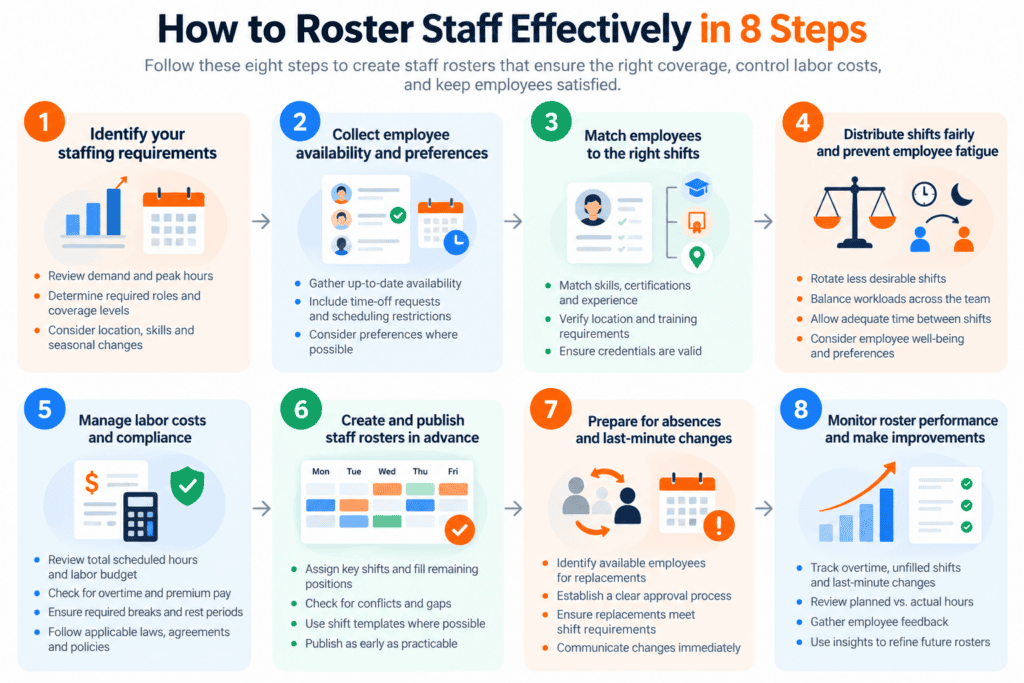
Successful staff rostering depends on a consistent process that balances business requirements with employee needs.
Here are eight steps to help you create more effective rosters.
1. Identify Your Staffing Requirements
Before assigning employees to shifts, determine how many people you need and when.
Start by reviewing historical staffing patterns, customer demand, operational hours, and expected workloads.
For example, a hotel may need more front-desk staff during check-in hours, while a security company may need different staffing levels based on client contracts and site requirements.
Consider the following questions:
- Which hours or days experience the highest demand?
- How many employees are required for each shift?
- Are specific roles or qualifications needed?
- Which locations require additional coverage?
- Are there seasonal or event-related changes to consider?
Build your roster around these requirements rather than simply assigning available employees to standard shifts.
Practical tip: Create a staffing requirements matrix that identifies the minimum number of employees needed for every shift, location, and role. This makes it easier to identify coverage gaps before building the actual roster.
2. Collect Employee Availability and Preferences
One of the most common rostering challenges is assigning employees to shifts they cannot work.
This often happens when managers rely on outdated availability records, informal conversations, or disconnected spreadsheets.
Before creating a roster, collect up-to-date information about employee availability, approved leave, shift preferences, and recurring commitments.
While operational requirements must come first, considering employee preferences where possible can help create a more positive scheduling experience.
Employees who receive greater predictability in their work schedules may find it easier to manage childcare, education, transportation, and other responsibilities.
Establish a clear deadline for submitting availability changes and time-off requests. Employees should also understand that preferences will be considered but cannot always be guaranteed.
Tools such as the Celayix employee scheduling app let employees share their availability, request time off, and access their schedules without relying on repeated phone calls or emails.
Practical tip: Keep employee availability in one centralized system and confirm it before scheduling future shifts.
3. Match Employees to the Right Shifts
Having enough employees available doesn’t necessarily mean you have the right employees available.
Some shifts require specific certifications, experience, training, or knowledge of a particular location.
For example, a healthcare facility may require workers with specific clinical qualifications, while a security company may need licensed guards who meet individual client requirements.
When assigning employees, consider whether they:
- Have the required skills and qualifications
- Are authorized to work at the assigned location
- Have completed necessary training
- Are available for the entire shift
- Meet any additional contractual or operational requirements
It’s particularly important to verify that required credentials will remain valid on the date of the assignment.
Failing to account for these requirements can result in last-minute schedule changes, uncovered shifts, and potential compliance problems.
Our employee certification tracking guide explains how organizations can monitor qualifications and connect them to scheduling decisions.
Practical tip: Define the qualifications required for each role or shift before assigning employees.
4. Distribute Shifts Fairly and Prevent Employee Fatigue
Effective staff rostering should balance operational efficiency with fairness.
Repeatedly assigning the same employees to undesirable shifts, overtime, or weekends can create frustration and increase fatigue risk.
Instead, establish clear and consistent scheduling practices.
Where practical, rotate less desirable shifts, respect employee preferences, and distribute working hours according to employment agreements and organizational policies.
Pay attention to the time employees have between shifts.
For example, scheduling someone to finish a late-night shift and return early the next morning may leave insufficient time to rest adequately.
The CDC’s National Institute for Occupational Safety and Health identifies extended working hours and nonstandard schedules as factors that can contribute to workplace fatigue, affecting concentration, judgment, and safety.
A fair roster doesn’t necessarily mean every employee receives identical hours. It means assignments follow transparent criteria and account for business needs, employment arrangements, and employee well-being.
Practical tip: Review each employee’s total scheduled hours, consecutive shifts, and allocation of weekends or nights before publishing the roster.
5. Manage Labor Costs and Scheduling Compliance
Labor costs are a major consideration when creating staff rosters.
Too few employees can leave teams overwhelmed and affect service quality. Too many employees can increase costs without delivering corresponding operational value.
The objective is to schedule enough qualified employees to meet demand while avoiding unnecessary overtime and overstaffing.
Before finalizing a roster, review:
- Total scheduled hours against your labor budget
- Potential overtime and premium-pay obligations
- Required meal breaks and rest periods
- Maximum working hours and other applicable restrictions
- Union agreements, employment contracts, and local scheduling requirements
Scheduling requirements differ by jurisdiction, industry, and employment arrangement.
For example, the U.S. Department of Labor’s recordkeeping guidance explains requirements for maintaining records of hours worked under the Fair Labor Standards Act.
Remember that a planned roster is not necessarily an accurate record of hours actually worked. Employers need appropriate time-and-attendance processes to meet applicable obligations.
Practical tip: Review projected labor costs and scheduling-rule conflicts before publishing shifts, rather than discovering problems after employees have worked them.
6. Create and Publish Staff Rosters in Advance
Once you’ve reviewed staffing requirements, availability, qualifications, and costs, it’s time to build the roster.
Start by assigning your most critical shifts, then fill the remaining positions based on availability and operational priorities.
Before publishing, check for overlapping assignments, uncovered roles, incorrect locations, insufficient break coverage, and scheduling conflicts.
Publishing schedules in advance gives employees more time to plan personal commitments and spot potential conflicts.
There isn’t one universal publication timeframe. Aim to provide as much advance notice as practical while following applicable scheduling laws, employment agreements, and organizational policies.
For teams with recurring schedules, shift templates can help managers reuse established shift patterns instead of rebuilding similar rosters every week.
It’s equally important to maintain a single, clearly identified current version of the schedule. Employees should know where to find the latest roster and how changes will be communicated.
Practical tip: Set a consistent scheduling cycle with deadlines for availability submissions, manager reviews, and roster publication.
7. Prepare for Absences and Last-Minute Changes
Even the most carefully planned staff roster will occasionally need adjustments.
Employees get sick, emergencies happen, and staffing requirements can change unexpectedly.
Without a clear process, managers may spend hours contacting employees, negotiating shift changes, and manually updating schedules.
An effective rostering process should include contingency planning.
Identify employees who may be available for additional shifts, establish rules for shift swaps, and define who can authorize schedule changes.
When replacing an employee, ensure the replacement meets the original shift’s requirements, including qualifications, availability, and any applicable working-hour restrictions.
For larger teams, employee scheduling software can help managers identify suitable replacements without manually searching through the entire workforce.
Once a change is approved, update the roster immediately and notify everyone affected.
Practical tip: Maintain a structured process for filling open shifts and recording approved changes so employees are never relying on outdated schedules.
8. Monitor Roster Performance and Make Improvements
Creating an effective staff roster isn’t a one-time activity.
Workforce requirements change, employee availability evolves, and some scheduling patterns work better than others.
Reviewing roster performance helps managers understand what needs improvement.
Useful metrics include:
| Metric | What It Helps You Understand |
| Unfilled shifts | Whether staffing requirements are being met |
| Overtime hours | Whether labor is being allocated efficiently |
| Last-minute schedule changes | How predictable and stable your rosters are |
| Scheduling conflicts | Whether availability and assignment rules are working |
| Planned vs. actual hours | How closely scheduling matches real staffing needs |
| Employee feedback | Whether the roster supports reasonable employee needs |
For example, consistently high overtime in one department may indicate that staffing requirements have been underestimated or that additional employee availability is needed.
Likewise, frequent last-minute replacements could reveal problems with roster publication, availability management, or communication.
Use these insights to refine shift patterns, improve staffing forecasts, and train managers on effective scheduling practices.
Practical tip: Review scheduling performance at the end of each roster cycle and identify at least one improvement for the next period.
What Should an Effective Staff Roster Include?

A well-designed staff roster should give managers and employees the information they need without creating unnecessary confusion.
At minimum, it should identify each employee, their assigned role, shift date, start and end times, and work location where applicable.
Depending on the workplace, it may also include break periods, shift status, qualifications, and the supervisor responsible for the shift.
Example of a Staff Roster
Here’s a simplified example of a single day’s roster for a retail location.
| Employee | Role | Scheduled Shift | Planned Break |
| Alex | Opening supervisor | 8:00 AM–4:30 PM | 12:30–1:00 PM |
| Morgan | Sales associate | 8:00 AM–4:30 PM | 12:00–12:30 PM |
| Jordan | Sales associate | 11:00 AM–7:30 PM | 3:00–3:30 PM |
| Taylor | Closing supervisor | 12:00–8:30 PM | 2:00–2:30 PM |
| Riley | Sales associate | 12:00–8:30 PM | 3:30–4:00 PM |
Illustrative example only. Actual staffing coverage, break timing, paid hours, and legal requirements must be reviewed for your workplace.
Notice how the shifts overlap during busier hours.
The roster also provides supervisor coverage during opening and closing periods, while staggered breaks help maintain staffing throughout the day.
This is an important rostering principle: the objective isn’t simply to fill every shift, but to maintain the right coverage throughout the working day.
For organizations managing hundreds or thousands of shifts, applying these principles manually becomes increasingly challenging.
What Are the Different Types of Staff Rosters?
Different businesses need different rostering approaches.
The right structure depends on operating hours, workload, employee availability, and required flexibility.
Fixed rosters assign employees consistent working days and hours. They suit businesses with predictable staffing needs and employees who benefit from stable schedules.
Rotating rosters move employees between shifts on a planned cycle. They can help distribute morning, evening, night, or weekend assignments across a team.
Flexible rosters accommodate varying employee availability and changing operational demands. They can help organizations with part-time employees, variable workloads, or seasonal staffing needs.
Split-shift rosters divide an employee’s workday into separate periods with a longer gap between them. These arrangements may suit businesses with distinct demand peaks but require careful consideration of employee preferences and applicable rules.
Some organizations use a combination of these approaches.
For example, a hotel might keep core employees on fixed schedules while using flexible rostering to cover banquets, special events, and seasonal demand.
The best rostering structure is one that meets business requirements without creating unnecessary scheduling complexity.
Common Staff Rostering Mistakes to Avoid
Even experienced scheduling managers can develop habits that reduce rostering efficiency.
Here are four common mistakes worth avoiding.
1. Reusing outdated schedules without reviewing demand. Last week’s roster may not reflect upcoming bookings, events, absences, or changing staffing requirements. Templates should be reviewed before they’re reused.
2. Ignoring employee preferences and workload balance. Focusing only on shift coverage can lead to unfair assignments, employee frustration, and avoidable conflicts.
3. Making changes without communicating them. A roster is only useful when employees know which version is current. Uncommunicated changes can lead to confusion and missed shifts.
4. Relying on disconnected spreadsheets as scheduling becomes more complex. Spreadsheets work for smaller teams, but managing multiple locations, qualifications, employee availability, and frequent changes across separate files becomes difficult.
Avoiding these mistakes helps create more reliable schedules and reduces unnecessary administrative work.
How Effective Staff Rostering Improves Productivity and Employee Satisfaction
Good rostering practices can benefit both employees and the organization.
More Reliable Coverage and Productivity
When staffing levels match operational demand, employees can complete their work without unnecessary pressure or idle time.
Managers also spend less time reacting to avoidable scheduling problems.
Research supports the importance of schedule stability.
A University of Chicago study of 28 Gap retail stores found that an intervention designed to improve scheduling stability increased median sales by 7% and labor productivity by 5%.
These were results from a specific retail study, not guaranteed outcomes for every business. However, they demonstrate that scheduling practices can influence operational performance.
Improved Employee Satisfaction
Predictable schedules help employees plan their personal lives and understand their working commitments.
When managers also consider availability, workload balance, and employee input, they can create a more transparent and collaborative scheduling environment.
These practices can boost job satisfaction and may help organizations reduce scheduling-related employee turnover.
Better Control Over Labor Costs
Effective rostering helps managers identify overstaffing, anticipate overtime, and align scheduled labor with expected demand.
This provides greater visibility into staffing costs before shifts are worked.
It also helps reduce the need for expensive last-minute coverage decisions caused by poor planning.
Ultimately, a good roster supports both operational performance and a more positive employee experience.
How Celayix Helps You Roster Staff More Effectively
As your workforce grows, creating effective rosters manually becomes increasingly difficult.
Managing availability requests, assigning qualified employees, controlling overtime, and coordinating unexpected changes can take significant time away from other management responsibilities.
Celayix employee scheduling software simplifies these processes with scheduling automation and centralized workforce management tools.
Its capabilities include:
- Automated scheduling: Assign available, qualified employees to shifts using configured scheduling rules.
- Autonomous workflows based on a scheduling rules engine: Check assignments against requirements such as qualifications, overtime limits, union rules, and double-booking restrictions.
- Shift Rescue: Identify available and qualified employees when unexpected staffing gaps occur.
- Employee self-service: Allow employees to view schedules, submit availability and time-off requests, and participate in self-scheduling or shift bidding where enabled.
- Scheduling analytics: Review operational data and projected costs to make more informed staffing decisions.
A Real-World Example
A table gaming company operating across 28 properties in the United States previously relied on paper-based schedules and manual updates to manage its workforce.
According to a Celayix customer case study, moving to centralized scheduling let the organization update rosters in real time, reduce administrative work, and give employees easier access to their schedules and time-off requests.
The example highlights why effective rostering becomes increasingly important as organizations grow and scheduling requirements become more complex.
Instead of spending hours rebuilding rosters and coordinating changes, scheduling teams can focus on workforce planning, employee support, and operational performance.
Frequently Asked Questions About Staff Rostering
How Do You Create an Effective Staff Roster?
Start by identifying staffing requirements for each shift. Then collect employee availability, verify qualifications, assign employees fairly, review labor costs and compliance requirements, and publish the roster in advance.
Once published, establish a clear process for handling changes and regularly review scheduling performance.
How Far in Advance Should Staff Rosters Be Published?
Publish rosters as early as reasonably possible to give employees time to plan.
The appropriate timeframe depends on operational requirements, applicable scheduling laws, union agreements, and employment contracts.
A consistent publication schedule is often just as important as the notice period itself.
How Can You Make Staff Rostering Fair?
Use clear scheduling criteria, consider employee availability and preferences, monitor total working hours, and distribute less desirable shifts consistently.
Employees should also have a transparent way to request changes or raise scheduling concerns.
Fair rostering balances individual circumstances with operational requirements rather than guaranteeing identical schedules for everyone.
Can You Create Staff Rosters Using Excel?
Yes. Spreadsheets can be useful for small teams with straightforward schedules.
However, as the number of employees, locations, shift requirements, and scheduling changes increases, manual spreadsheets can become harder to maintain.
Dedicated staff scheduling software can help centralize information, apply scheduling rules, and communicate updates more efficiently.
What Is the Difference Between a Staff Roster and a Work Schedule?
The terms are often used interchangeably.
Both describe which employees are expected to work at particular times and locations.
A staff roster may emphasize employee assignments across roles or sites, while a work schedule may focus on an individual’s hours. In practice, the distinction depends on the organization.
Make Staff Rostering Easier With Celayix
Effective staff rostering starts with understanding your workforce needs and building a consistent scheduling process.
By forecasting demand, considering employee availability, assigning qualified workers, managing labor costs, and communicating schedules clearly, organizations can build rosters that support both productivity and employee satisfaction.
But as scheduling requirements become more complex, even a well-designed manual process can become difficult to maintain.
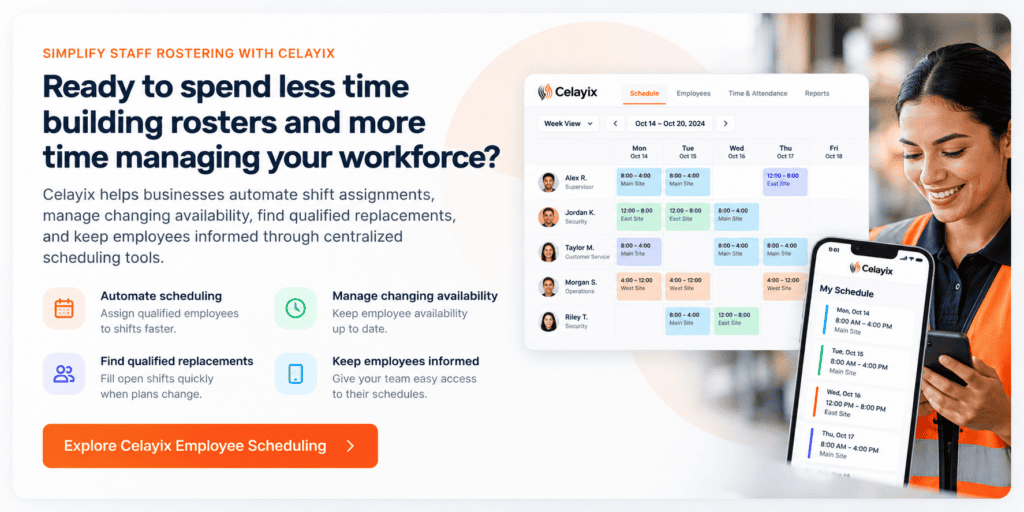
Celayix helps businesses automate shift assignments, manage changing availability, find qualified replacements, and keep employees informed through centralized scheduling tools.
Ready to spend less time building rosters and more time managing your workforce?
Book a Celayix demo to discover how automated staff scheduling can help simplify your operations and improve workforce coverage.