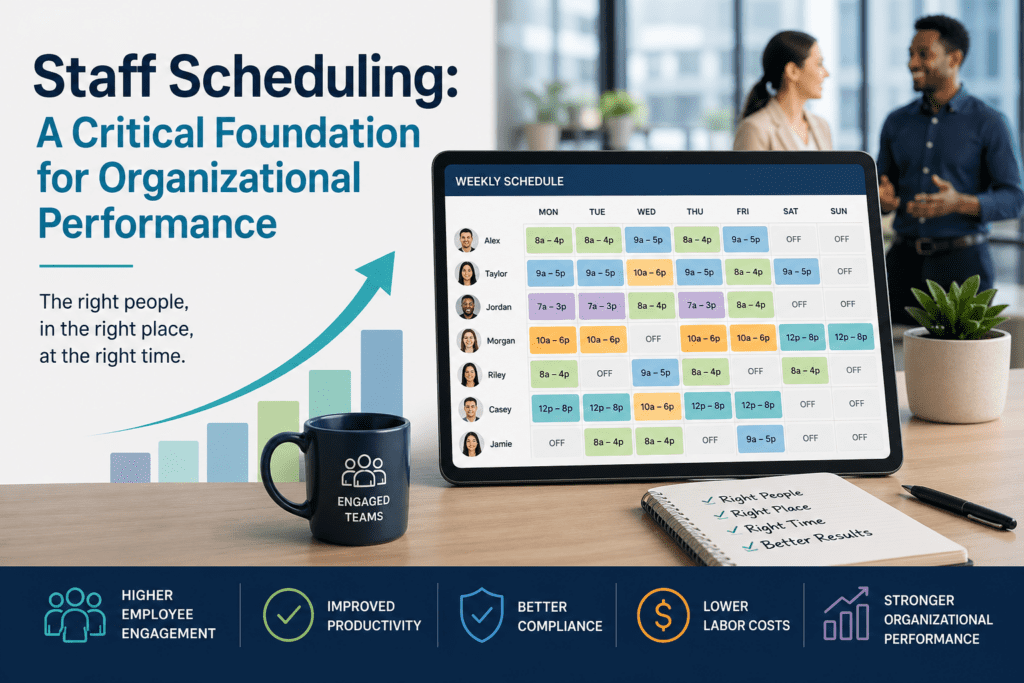

For organizations that rely on hourly, mobile, or shift-based teams, staff scheduling is much more than an administrative task. It directly affects labor costs, service quality, compliance, employee satisfaction, and profitability.
A well-built schedule ensures the right people are in the right place, at the right time, with the right qualifications. A poor schedule can lead to missed shifts, avoidable overtime, compliance risks, payroll errors, employee frustration, and dissatisfied customers.
That is why modern organizations are rethinking staff scheduling. Instead of treating it as a manual back-office process, they are using automated scheduling and workforce management tools to improve coverage, control costs, and make better operational decisions.
What Is Staff Scheduling?
Staff scheduling is the process of assigning employees to shifts based on business demand, employee availability, qualifications, labor rules, and operational requirements.
At a basic level, scheduling answers questions like:
- Who is working?
- When are they working?
- Where are they needed?
- What role or task are they assigned to?
But in practice, effective staff scheduling is much more complex. Managers often need to account for overtime limits, union rules, certifications, availability, time-off requests, seniority, location requirements, and last-minute absences.
For industries such as security, healthcare, hospitality, and events, scheduling mistakes can quickly affect service delivery. A missing guard, caregiver, server, or event worker can create operational gaps that are costly and difficult to fix at the last minute.
Why Staff Scheduling Is More Complex Than It Looks
Many people assume creating a schedule is simple. But once managers begin balancing real-world constraints, the process becomes much more demanding. A scheduler may need to consider:
- Which employees are available?
- Which employees have the right qualifications?
- Which shifts are most urgent to fill?
- Which employees are approaching overtime?
- Which locations require coverage?
- Which labor rules, union agreements, or internal policies apply?
- What happens if someone calls in sick or does not show up?
- How quickly can the schedule be updated and communicated?
When scheduling is handled manually, these questions take time to answer. Mistakes are also easier to make. A manager may accidentally assign an unqualified employee, approve unnecessary overtime, overlook an availability conflict, or fail to communicate a schedule change in time.
Automation helps reduce those risks. With the right staff scheduling software, organizations can build schedules faster, apply rules consistently, communicate updates instantly, and respond to changes before they disrupt operations.
The Business Impact of Poor Scheduling
Scheduling errors affect nearly every part of an organization. The consequences usually fall into four major areas:
| Problem area | What goes wrong | What it costs you |
| Customer satisfaction | Unfilled shifts, understaffing, or unqualified workers on site | Service-quality issues, lost trust, and reduced repeat business |
| Compliance | Manual application of labor laws, union rules, and certification requirements | Grievances, penalties, and disruption — particularly costly in regulated industries |
| Operating cost | Avoidable overtime, manager time spent rebuilding schedules, payroll errors | Inflated labor cost and management capacity pulled away from higher-value work |
| Employee retention | Late, inflexible, or poorly communicated schedules | Burnout, absenteeism, and turnover costs that compound over time |
Each of these problems is fixable. The hard part is fixing them simultaneously with the same set of tools, which is exactly what modern scheduling software is designed to do.
How Staff Scheduling Software Helps
Staff scheduling software helps organizations move from reactive scheduling to proactive shift management. Instead of relying on spreadsheets, phone calls, paper schedules, or disconnected systems, managers can use one platform to plan shifts, assign employees, manage availability, track attendance, and communicate changes.
For organizations with multiple locations, mobile workers, or complex labor requirements, these tools reduce manual work while improving visibility across the workforce.
Five Ways Staff Scheduling Software Saves Money
1. Reducing manual scheduling time
Manual scheduling takes time, especially when managers are coordinating many employees, locations, roles, and rules. Staff scheduling software automates much of that work: weekly, monthly, rotating, and recurring schedules can be built far faster while still respecting availability, qualifications, and demand. Celayix customers commonly report cutting schedule-creation time by up to 95%.
That gives managers more time for higher-value work — improving service delivery, coaching employees, managing customer needs, and addressing operational priorities.
2. Filling last-minute open shifts faster
No-shows, sick calls, and last-minute changes are unavoidable and not cheap. Industry research from CIRCADIAN places the average cost of unplanned absenteeism at roughly $3,600 per hourly employee per year. The real challenge is how quickly an organization can respond.
Without software, managers may need to call or message employees individually until they find someone available. That process is slow and frustrating.
With automated replacement workflows, managers can identify eligible employees, send shift opportunities, and confirm replacements in minutes. Celayix’s Find Replacement feature, for example, helps organizations fill open shifts without relying on manual phone trees. For teams in security, healthcare, hospitality, and events — where uncovered shifts immediately affect service quality — that speed matters.
3. Controlling avoidable overtime
Overtime is sometimes necessary, but avoidable overtime can quietly erode profitability. Staff scheduling software can show managers when employees are approaching overtime thresholds before assignments are made. Scheduling rules can be configured to flag or prevent unnecessary overtime, helping organizations stay within budget while still maintaining shift coverage.
Better overtime visibility also supports fairer scheduling, because managers can distribute work more evenly across available employees.
4. Improving time and attendance accuracy
Scheduling and time tracking work best when they are connected. When employees clock in and out through a time and attendance system, organizations can compare scheduled hours against actual hours worked, and identify missed punches, late arrivals, early departures, and exceptions in real time.
Mobile clock-ins, location-based validation, and alerts also help reduce time theft, buddy punching, and inaccurate timesheets — issues that, by American Payroll Association estimates, can quietly cost up to 8% of payroll.
For employers, this creates cleaner labor data. For employees, it supports more accurate pay.
5. Streamlining payroll and billing
Payroll and billing errors are costly and time-consuming to fix. When scheduling, time and attendance, and payroll systems are disconnected, managers often move data between tools manually, which creates opportunities for errors, delays, and duplicate work.
A connected workforce management system lets approved time records flow into payroll and billing more smoothly. Employees get paid for the time they worked, customers get billed for the hours delivered, and administrative rework drops sharply.
Celayix has helped customers save more than $22,000 a year by improving scheduling, check-in/out, timesheet validation, invoicing, and payroll. The ROI Calculator can help estimate the potential savings for your operation.
How to Create an Effective Staff Schedule
Creating an effective staff schedule is about more than assigning employees to shifts. The best schedules balance business demand, employee availability, labor costs, compliance requirements, and customer service expectations. Whether you’re scheduling 20 employees or 2,000, following a structured process helps reduce last-minute changes, improve productivity, and create a better experience for both managers and employees.
1. Forecast Staffing Demand
Start by understanding how many employees you’ll need and when you’ll need them. Review historical schedules, sales data, customer traffic, seasonal trends, upcoming events, and known absences to predict demand as accurately as possible.
For example:
- A hospital may need additional nurses during flu season.
- A hotel may increase staffing during conferences or holidays.
- A security company may require extra officers for concerts, sporting events, or large public gatherings.
Accurate forecasting helps prevent both understaffing, which impacts service, and overstaffing, which increases labor costs.
2. Collect Employee Availability
Before building the schedule, gather employee availability, approved time-off requests, and preferred working hours. Maintaining up-to-date availability reduces scheduling conflicts and increases employee satisfaction.
Modern employee scheduling software allows employees to update their availability through a mobile app, eliminating spreadsheets, emails, and paper forms.
3. Verify Skills, Certifications, and Qualifications
Not every employee can work every shift. Certain roles require specific certifications, licenses, training, or experience.
Before assigning employees, verify requirements such as:
- Professional certifications
- Security licenses
- Healthcare credentials
- Equipment training
- Required job skills
Automatically validating qualifications helps organizations remain compliant while ensuring every shift is staffed with appropriately qualified employees.
4. Apply Labor Rules and Business Policies
Effective schedules must comply with company policies and labor regulations before they’re published.
Consider rules such as:
- Maximum weekly hours
- Overtime thresholds
- Required meal and rest breaks
- Union agreements
- Minimum time between shifts
- Seniority rules
- Employee availability
- Fair distribution of hours
Automated scheduling systems can evaluate these rules while creating schedules, helping managers reduce compliance risks and costly scheduling errors.
5. Build and Optimize the Schedule
Once demand, availability, and business rules have been established, it’s time to create the schedule.
Many organizations still rely on spreadsheets or manual scheduling, but modern scheduling software can automatically recommend or generate optimized schedules based on multiple constraints simultaneously.
Automation helps managers:
- Reduce scheduling time
- Balance workloads fairly
- Minimize overtime
- Fill qualified positions faster
- Improve schedule accuracy
Managers can then review suggested schedules and make adjustments before publishing.
6. Publish the Schedule Early
Publishing schedules well in advance gives employees time to plan their personal commitments while reducing confusion and last-minute changes.
Mobile scheduling applications allow organizations to:
- Notify employees instantly
- Confirm schedule receipt
- Reduce missed communications
- Eliminate printed schedules
Clear communication improves employee engagement and helps reduce no-shows.
7. Manage Open Shifts and Schedule Changes
Even the best schedules require adjustments. Employees call in sick, customer demand changes, and unexpected events occur.
An effective scheduling process includes tools to:
- Fill open shifts quickly
- Offer shifts to qualified employees
- Support employee shift swaps
- Notify available staff instantly
- Maintain compliance throughout schedule changes
Responding quickly minimizes service disruptions while reducing the administrative burden on managers.
8. Track Attendance in Real Time
Publishing the schedule is only part of the process. Managers also need visibility into whether employees arrive on time, complete their shifts, and take required breaks.
Integrating scheduling with time and attendance allows organizations to:
- Compare scheduled versus actual hours
- Monitor attendance
- Identify tardiness and no-shows
- Capture accurate payroll data
- Improve workforce accountability
Real-time visibility enables managers to resolve issues before they impact operations.
9. Analyze Results and Continuously Improve
The most effective organizations treat scheduling as an ongoing optimization process rather than a weekly task.
Review key scheduling metrics such as:
- Schedule creation time
- Overtime hours
- Open shift rate
- No-show rate
- Labor costs
- Schedule accuracy
- Employee satisfaction
- Shift coverage
These insights help managers identify trends, improve future schedules, and make more informed staffing decisions over time.
The Staff Scheduling Process
A consistent scheduling workflow helps organizations create accurate schedules while reducing manual effort and improving workforce performance.
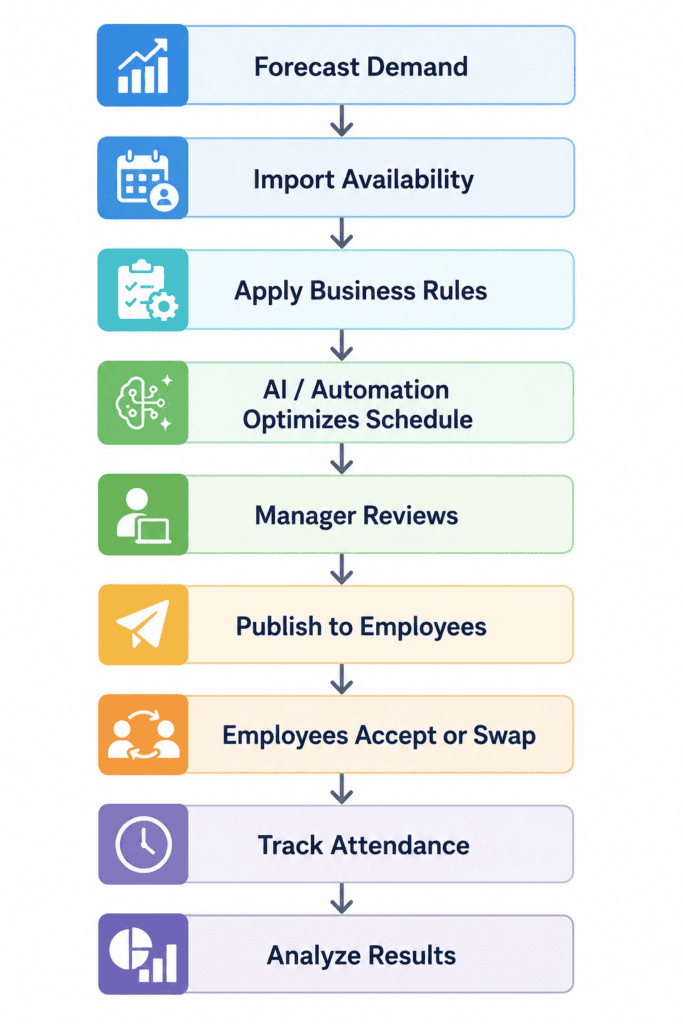
Organizations that follow a structured scheduling process are better equipped to reduce overtime, improve employee satisfaction, maintain compliance, and respond quickly to changing business needs. With modern staff scheduling software, many of these steps can be automated, allowing managers to spend less time building schedules and more time supporting their teams.
What to Look for in Modern Staff Scheduling Software
Not all scheduling tools are built for complex shift-based operations. Organizations should look for software that supports both day-to-day scheduling and broader workforce management. Important capabilities include:
- Automated scheduling based on demand, availability, and qualifications
- Rules for overtime, compliance, certifications, and labor requirements
- Mobile access for employees and managers
- Open shift and replacement workflows
- Real-time notifications and communication tools
- Time and attendance tracking with location verification
- Payroll and billing integration
- Reporting and workforce analytics
- Support for multiple locations, roles, and departments
The goal is not simply to create a schedule faster. The goal is to build a more reliable, compliant, and cost-effective operation.
Staff Scheduling is Now a Strategic Business Function
Staff scheduling has evolved from a routine administrative task into a critical part of workforce management. For shift-based organizations, every schedule affects labor cost, coverage, compliance, employee experience, and customer satisfaction.
When scheduling is done manually, managers spend too much time reacting to problems. When scheduling is automated and connected to time, attendance, payroll, and analytics, organizations gain real control over their operations.